Make coverage visible.
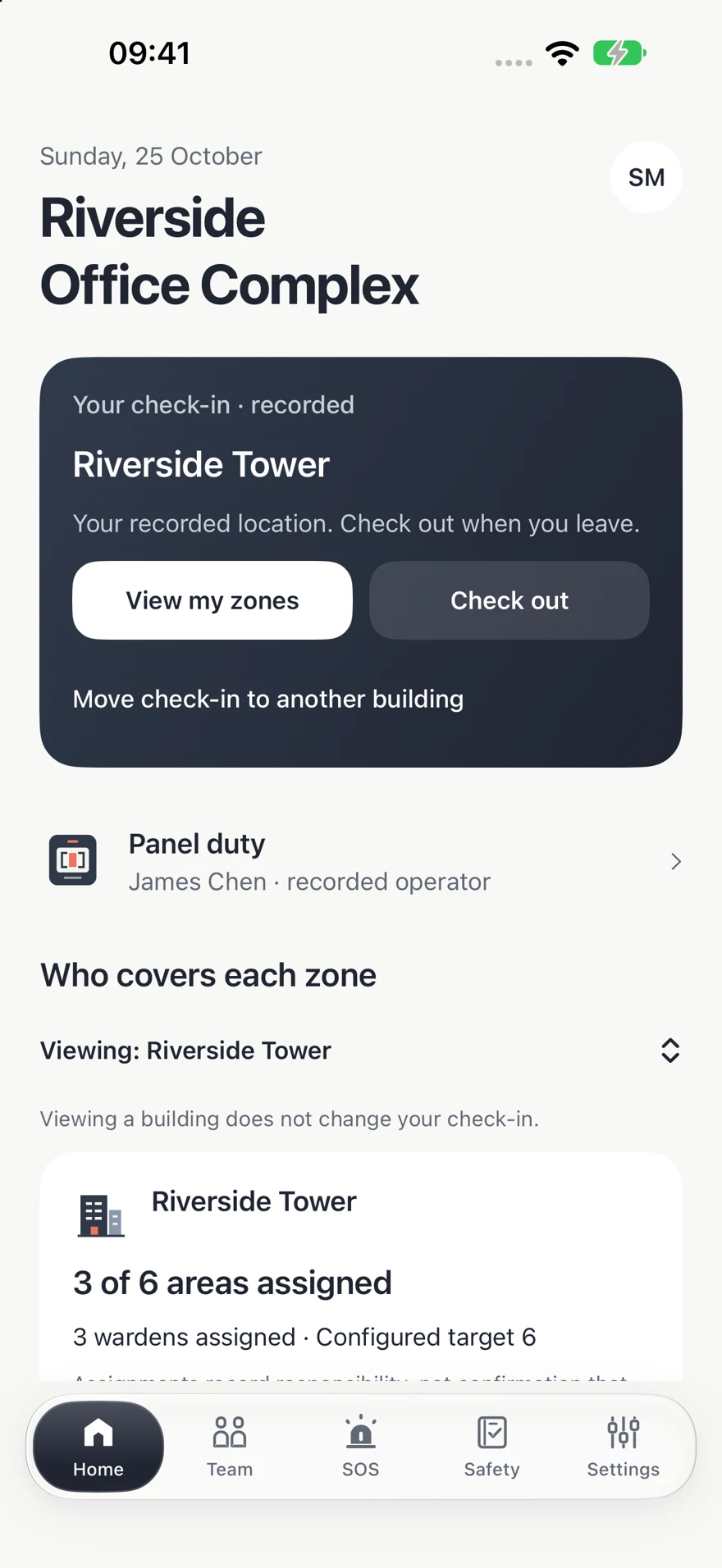
Review recorded attendance and zone assignments. Wardens claim the areas they can cover and release them when their responsibilities change.
 Build Forward
 MarshalUp Pre-release · iPhone & iPad
Recorded coverage, routine checks and follow-up. Together.
For staffed offices and commercial workplaces. Give the team’s fire-safety tasks a shared place to live.
App Store release pending.
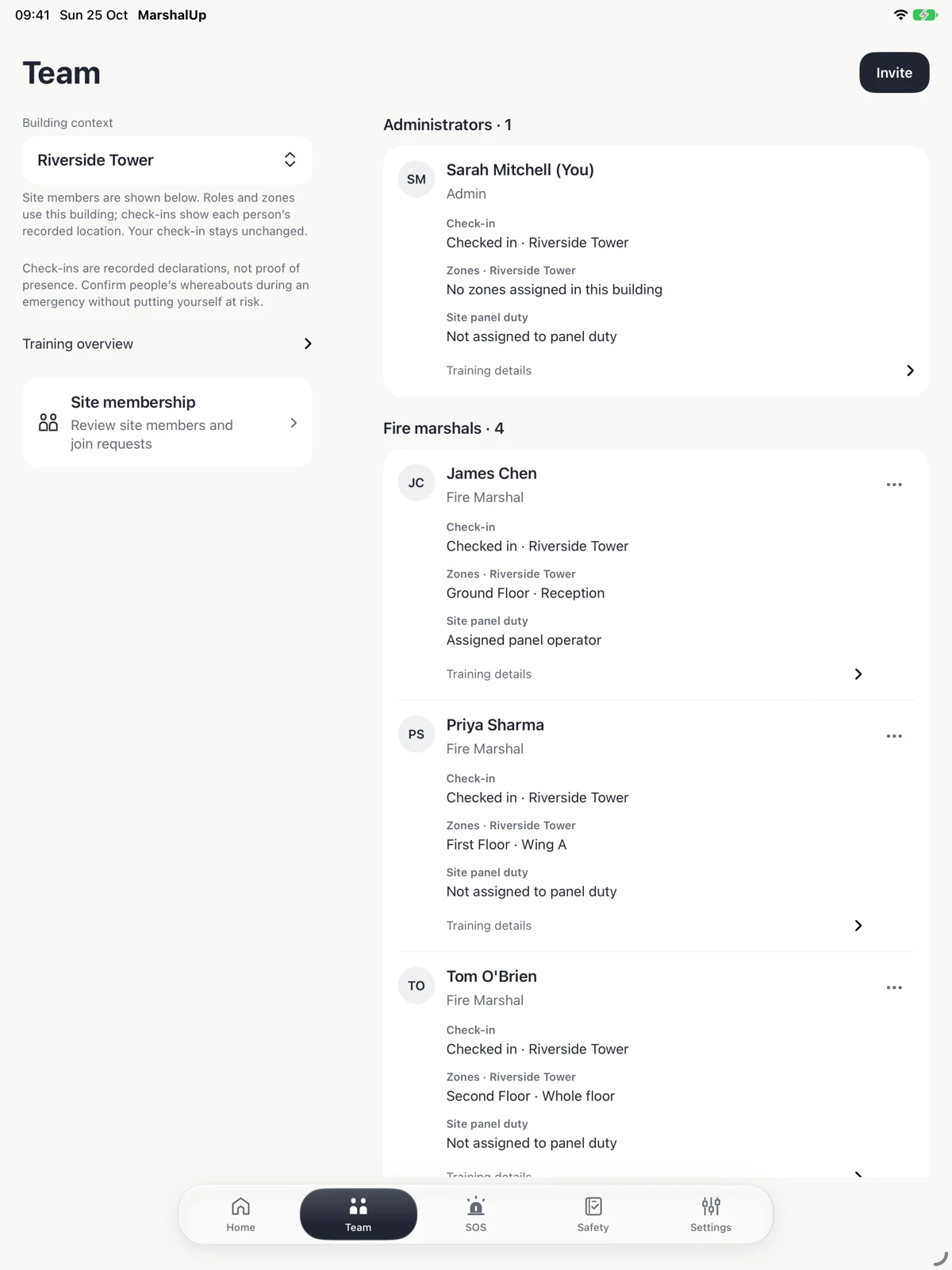
See what is recorded, what needs attention and who is responsible for the next step.
Review check-ins and zone assignments. Wardens can claim the areas they cover and release them when responsibilities change.
Check-ins and assignments are not independently verified occupancy or proof that a person is safe.
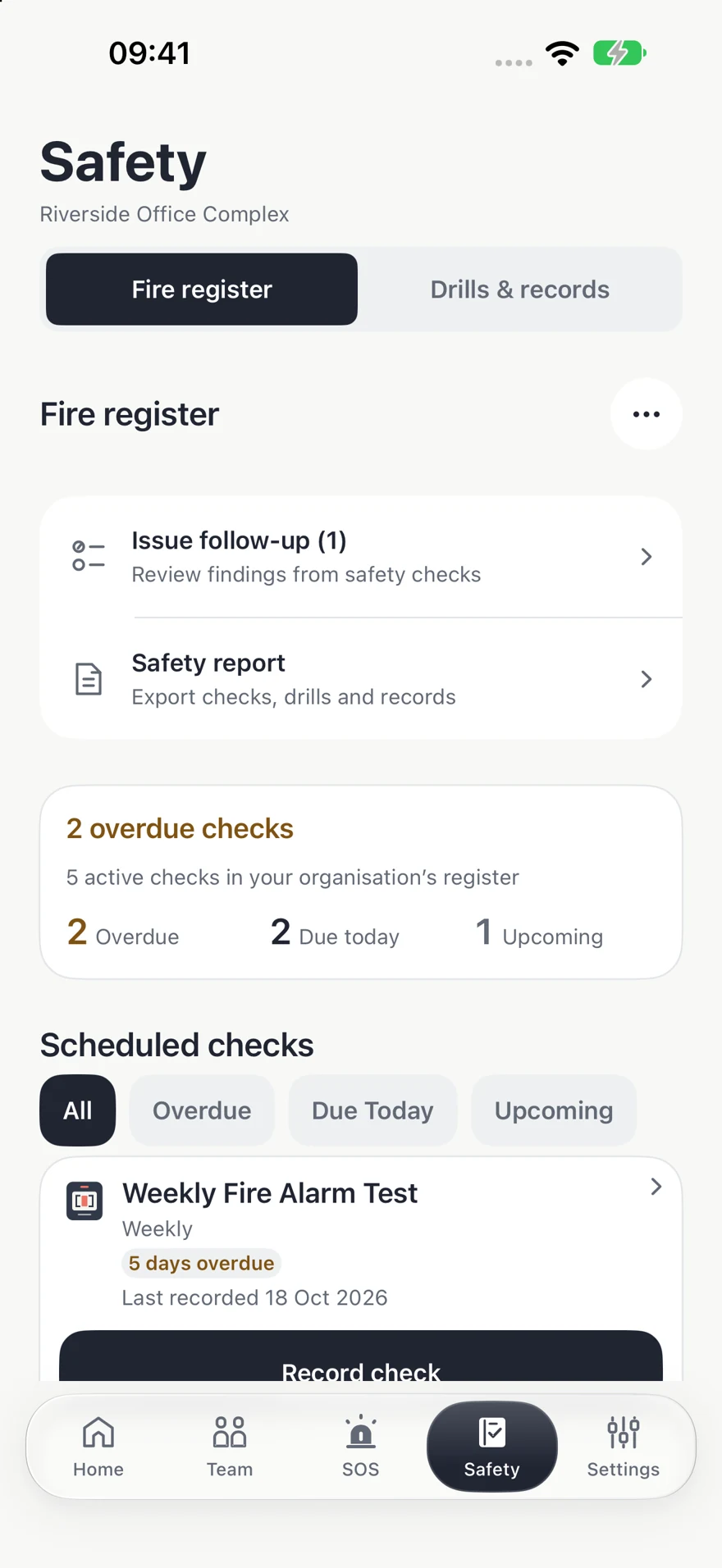
Choose checks and schedules for your workplace. Keep results and findings alongside the actions taken.
The workplace remains responsible for its required checks, staffing and safety procedures.
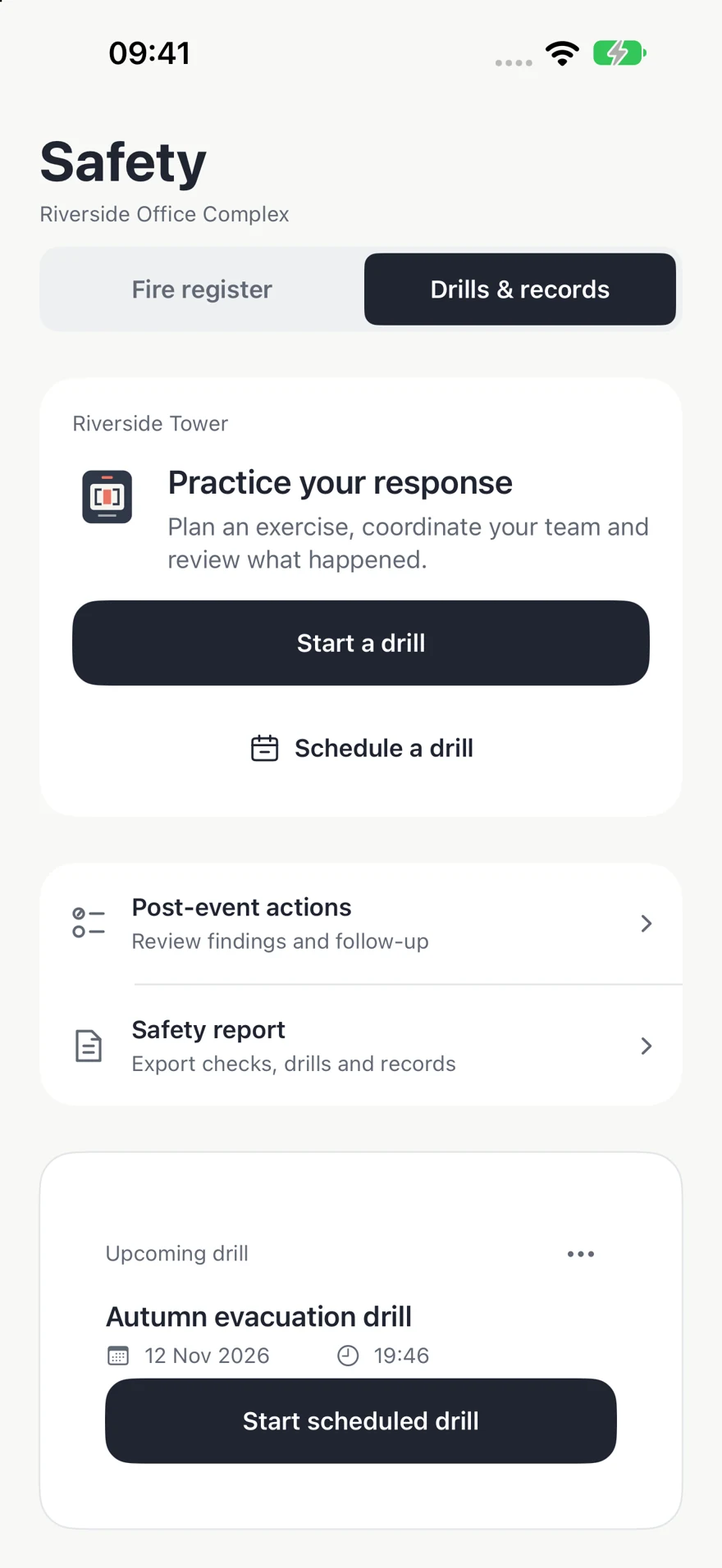
Coordinate a drill, then use the record to review what happened and what needs attention.
App alerts depend on settings and connectivity. Delivery is not guaranteed; maintain independent procedures.
A MarshalUp site covers one shared alarm activation. Several connected buildings can belong to it when their alarms sound together.
Same panel · alarms sound together
One site can include several buildings within that shared alarm scope.
Own alarm scope
Own alarm scope
Separate locations need separate site setup and entitlement arrangements, even within one company.
Illustrative arrangements. MarshalUp does not connect to or operate a physical alarm panel.
01 / EVERYDAY CLARITY
Give everyday tasks a clear place, so your team can see what is recorded and what still needs attention.
Review recorded attendance and zone assignments. Wardens claim the areas they can cover and release them when their responsibilities change.
Choose checks and schedules for your workplace. Record results and keep failed inspections alongside the actions taken.
Follow up findings, record responsibility and keep useful PDF records of checks, drills and events.
Plan an exercise, coordinate responses and review the record afterwards. Keep observations and follow-up actions together.
MarshalUp supports your procedures. App alerts depend on settings and connectivity; delivery is not guaranteed.
A CLEAR START
Confirm the shared alarm scope. Add buildings, floors, zones and assembly points.
Share the site code, review requests and assign the appropriate workplace roles.
Check in when on site, review coverage and record the checks your workplace needs.
MarshalUp does not detect fire, operate alarms, call emergency services or guarantee compliance.
Recorded check-ins and app statuses can be incomplete or out of date. They are not proof of presence or safety.
Follow established alarm, evacuation and accountability procedures. Never enter danger or delay an emergency action to verify an app record.
Read the service’s scope and termsThe same features on both plans. Choose monthly or annual billing, with no per-person charge.
€34.99/ month
Billed monthly.
Renews until cancelled.
€374.99/ year
One annual payment.
Renews until cancelled.
Irish App Store reference prices. Other storefront prices may differ. Apple shows the final price, applicable taxes and any eligible introductory offer before purchase. Manage renewal in your Apple account. Deleting the app or a site does not cancel a subscription.
Each site must share one alarm activation. Buildings in separate locations need separate site and entitlement arrangements. The app interface and support are in English.
Questions about MarshalUp?
There’s a person on the other end.
Contact MarshalUp support
No. It does not detect fire, activate a physical alarm or call emergency services. Always follow your workplace alarm and evacuation procedures.
Each site covers one shared alarm activation. Buildings at separate locations need separate site setup, even if the same company owns them.
The app includes an illustrative demo without an account. Connected team features require an account and approved site access.
The Irish App Store reference prices are €34.99 per month or €374.99 per year for one shared-alarm site, with the same features on either plan. There is no per-person charge. The app shows your storefront’s final price and any eligible trial before you confirm with Apple.
No. MarshalUp supports coordination and record keeping. Your organisation remains responsible for its fire-safety arrangements, staffing and procedures. Check-ins and assignments are recorded information, not proof of presence or safety. Never put yourself at risk to verify a record.
Telephone: +353 857532402. Email is the main support channel. This is an ordinary contact number, not an emergency or 24/7 support line.
What MarshalUp processes, why it is used and the choices available to you.
MarshalUp is operated by Ovidiu Dinu, an individual based in Ireland (“I”, “me” or “the operator”). MarshalUp is the service name. Contact Build Forward support about privacy. BuildForward is used in the support-domain name. Neither name identifies a separate legal supplier. Geographic contact address: 206 The Kestrel, The Sanctuary
Mahon
Cork T12D579
Ireland
Your workplace decides how MarshalUp is used at its site, who has access and which operational records to enter. It is responsible for explaining its workplace purposes and legal basis. MarshalUp's operator handles account administration, service security, billing reconciliation and support.
For the described service, your workplace is the controller of the operational records it instructs me to process, and I act as its processor under a separate data-processing agreement. I act as a controller for my own account administration, purchase reconciliation, service security and direct support purposes described below. These responsibilities depend on the actual processing. Your workplace should give you its own privacy information and identify its contact. This notice is information about processing; reading it or using the app does not itself give consent or execute a workplace data-processing agreement.
Account identity and sign-in information are needed to create and secure an account. Without them I cannot provide account access. Your workplace determines which operational records it requires and should explain the consequences of not supplying them. Optional support attachments are not required for an account; avoid sending unnecessary personal information.
Records may be entered by you, your administrator or other authorised team members. When completing a check, you can take or choose a photo and draw a signature where the check asks for this evidence. On saving the check, compressed photo and signature images are stored with its record in Firebase and can be viewed by authorised users with access to that record. A drawn signature is recorded evidence, not independent verification of identity or confirmation that a workplace is safe. Only include relevant evidence and avoid unnecessary images of people or sensitive information. Camera access requires your permission; the photo picker lets you choose the image to attach. Older records may also contain external attachment links; opening those links can involve the external host. The QR scanner uses camera input to read a code; camera frames are processed on the device rather than uploaded by this scanner. This version does not request device Location Services. Selecting a building or recording a zone/status can still indicate where someone is at work.
Do not enter medical histories, personal evacuation plans or other unnecessary sensitive information in free-text notes. Older records may contain absence reasons or other sensitive information. Removing a feature does not erase previously stored information. If special-category data is retained or collected, the workplace and operator must establish the additional lawful conditions and safeguards before use.
Packaged provider SDKs also declare technical diagnostics and service-quality analytics, including processing at app launch. These are service-quality and technical purposes rather than an app advertising feature. Provider processing and optional email engagement are described separately below; not every SDK activity is treated as necessary for your contract.
Your workplace determines its lawful basis for attendance, coverage, checks and incident records and, if necessary, an additional Article 9 condition for special-category data. Employee consent is not assumed. Camera and notification permission are device choices, not blanket consent to processing. No solely automated decision with legal or similarly significant effects is made by this service.
If a record is disputed or inaccurate, contact your workplace administrator or support through the appropriate rights/correction route. Where appropriate, ask for it to be marked as disputed while checked; this notice does not claim the app has a dedicated dispute-status feature. Do not add medical details, speculate about a person’s condition or collect extra sensitive data merely to compensate for uncertain records. Report urgent concerns through workplace emergency procedures; a support or correction request is not an emergency alert.
These accuracy and safety limitations do not remove the workplace’s or the operator’s applicable accuracy, security and other data-protection obligations. This notice does not limit liability, waive a claim, constitute consent to tracking or replace the workplace agreement. Rights and remedies remain governed by applicable law.
Authorised people at your site can access records according to their roles. Administrators manage access. Information you put in a report, poster or exported file can reach the people with whom you share it. A share/export action is not controlled by the app after the recipient receives the file.
The operator remains accountable for its own processing and applicable processor obligations. A provider’s involvement or a workplace administrator’s role does not by itself remove that responsibility or a person’s statutory rights.
Access by the operator or service providers is limited to service, support, security, legal and operational purposes. Information may also be disclosed where lawfully required, or to protect rights and security. We do not operate an advertising business or intentionally sell workplace records. This does not mean no provider collects technical or engagement data.
Brevo-delivered messages may include hidden images that record message loading and rewritten links that record clicks. Depending on the mail client and provider, this can involve recipient/message identifiers, event times, link information and technical request information such as IP/device data. Privacy-proxy loading can create an event without a person reading the message.
The Brevo account is configured to use per-contact tracking consent and not track contacts whose consent is unknown. Brevo describes these controls as limiting individual open/click tracking to contacts with recorded consent. This is not a promise that every tracking image or rewritten link is removed: received test messages retained those elements, and Brevo can still perform aggregate delivery-related or security processing. Anonymous reporting alone is not a promise of tracking-free email.
MarshalUp uses delivery/failure information to monitor operational messages, not individual open/click activity for advertising, engagement scoring or personalised marketing. A load or click is not proof that a notice was read or that deletion may proceed. Any optional recipient-level engagement use must have valid separate consent or an applicable exemption before it is enabled; agreeing to service terms or receiving an operational email is not such consent. Blocking remote images or protecting your mail privacy may reduce image loading but does not ensure link-click tracking is disabled.
The main Firestore database is configured in the European multi-region eur3. Some functions and provider services operate elsewhere, including the United States. This is not a promise that all data stays in Ireland or the EU. Authentication, messaging, support email, telemetry and subprocessors have their own processing arrangements.
International processing is service-specific. Google publishes its Cloud Data Processing Addendum, Firebase processing terms and transfer provisions; Apple and Brevo publish their own relevant terms and privacy information. Where a transfer needs a Chapter V safeguard, the applicable mechanism must cover that particular service and destination. Contact support for the relevant arrangement and information about obtaining a copy of safeguards, subject to necessary redaction. An EU database region alone does not establish the safeguards for every provider operation.
The service uses authenticated access, role controls, encrypted transport and provider security measures. No system can guarantee perfect availability or security. Firestore can keep a persistent local cache; selected building, assembly-point and emergency-contact details are also stored on the device for offline access. Protect shared devices and downloaded files. Do not assume that deleting an account remotely erases every cache or copy on a device. Protect the device, sign out when appropriate and handle local copies securely.
Account and operational records are kept to provide site access, maintain records and deal with support, security and legal requirements. Retention must be limited to those purposes and reviewed when the data is no longer needed. The following periods and criteria distinguish workplace history, closed sites and necessary operational evidence. A commercial closure period is not itself a statutory fire-safety record-keeping period.
The standard workplace instruction is two calendar years of historical workplace records. For checks, the period starts at completion or closure of necessary follow-up; for incidents and drills, it starts when coordination ends or necessary follow-up closes, whichever is later. This includes the recorded linked log, observations and actions. Current site configuration and account access are not erased merely because they were created two years ago. A shorter necessary period, a valid earlier erasure instruction or a specifically justified legal hold can require different handling.
For a site that never became paid, the closure period is 30 calendar days after trial access ends. For a previously paid site, it is six calendar months after paid access ends. Routine final deletion is no earlier than 30 full days after the first verified final-notice delivery observation: the later deadline applies. Cancelling renewal alone does not end paid access or start the closure period. These are manual policy periods while automated cleanup is paused, not a promise that a background job erases records exactly when a timer expires.
Automatic inactive-site retention cleanup is paused. Requests and due cases are reviewed individually under the manual procedure; expiry alone is not confirmation that erasure has completed. User-requested account deletion remains available; background automatic recovery for interrupted account deletions is disabled, so interrupted requests require operator follow-up. Any legacy visitor cleanup is separate from the never-paid trial-site policy.
Successful owner deletion targets the site and its operational records and detaches other members; it does not delete other people's own login accounts. Member deletion targets the member account and associated records. Some shared historical records may still contain names or action references. Subscription-binding records are deliberately retained to prevent receipt reuse; deletion-job, email, provider and security records require separate review and handling. App deletion is not a promise to erase every copy held by a workplace, provider or recipient.
Scheduled Firestore backups have a seven-day retention window and point-in-time recovery is enabled with a rolling recovery window. Copies can outlive removal from the live database until they expire. Any restore must reconcile subsequent erasure requests. Local exports and recipient copies have their own retention. Provider-controlled copies and required security logs follow their applicable service controls and lawful retention criteria; the operator must assess them separately during an erasure case rather than claim that deleting a site erases every provider copy.
I aim to acknowledge routine requests within three business days (Monday to Friday excluding Irish public holidays). This does not postpone action that is required without undue delay, change a statutory deadline or promise completion within three business days. Request deadlines are recorded from the original receipt where applicable, not from acknowledgement or internal assignment.
Depending on the legal basis and circumstances, you can request access, correction, erasure, restriction, portability or object to processing. Where processing genuinely depends on consent, you can withdraw it without affecting earlier lawful processing. These rights have limits; we will explain any lawful refusal or restriction.
Contact Build Forward support or your workplace administrator. We will route requests according to the relevant controller's responsibilities and verify identity proportionately. Requests are normally addressed within one month under GDPR, with a lawful extension where necessary and notified to you. You can complain to Ireland's Data Protection Commission or your competent supervisory authority.
You can manage camera and notification permissions in iPhone Settings. Declining notifications can prevent app alerts, so use the workplace's established alarm and communication procedures. The product is intended for staffed workplaces and is not designed as a children's service. These pages contain no analytics script, cookies or third-party fonts; the hosting service may still process technical request logs.
Version 1.0, prepared 26 October 2026. Public information revision 1.0.1, prepared 13 November 2026, corrects the descriptions of check evidence and workplace PDF exports. This does not replace an accepted workplace agreement or its receipt. The published page identifies when this notice takes effect. Material changes will be communicated appropriately, and any required consent or agreement obtained before the affected processing. Contact support for the applicable version. A privacy notice provides information; it is not a workplace DPA or consent to optional tracking.
Telephone: +353 857532402. Email is the main support channel. This is an ordinary contact number, not an emergency or 24/7 support line.
The scope of the service and the responsibilities of people using it.
The supplier of the MarshalUp service is Ovidiu Dinu, an individual based in Ireland (“I”, “me” or “the operator”), using Build Forward support for support. MarshalUp is the product name and BuildForward is the support-domain name; neither is a separate contracting party. Geographic correspondence address: 206 The Kestrel, The Sanctuary
Mahon
Cork T12D579
Ireland No company or registered business-name number is represented.
MarshalUp is intended for businesses managing staffed offices or commercial workplaces and for authorised members of their teams. A person establishing or purchasing access for a workplace must have authority to do so. It is not intended for unsupervised use by children.
Apple's applicable App Store terms and standard application licence apply to the app licence where relevant. These service terms supplement the applicable app licence and preserve mandatory Apple terms and statutory rights. Apple's purchase process does not by itself establish that a workplace has authorised an individual to accept a separate data-processing agreement.
The customer is the person or organisation identified in the recorded service acceptance. A person accepting on behalf of a workplace must have authority to bind it. A team member's invitation, sign-in or approval does not by itself establish that the workplace accepted a customer contract or data-processing agreement. Members must follow the account and acceptable-use rules that apply to them.
Before acceptance, the customer must be able to review and retain the exact terms, applicable service/order details and data-processing agreement. The acceptance receipt identifies the accepting party, authority declaration, exact document versions and server-confirmed date. Publishing a copy is not itself a customer signature.
The intended customer is a workplace business or organisation. If you are legally a consumer, mandatory consumer rights and required pre-contract information continue to apply. Merely describing the product as business software does not remove those rights.
MarshalUp supports warden coordination, attendance and coverage records, checks, drills, incident coordination and reports. Each site represents one shared alarm-activation scope. Multiple buildings may be included only when they connect to the same fire alarm panel and their alarms sound together. Separate sites require separate setup and entitlement arrangements.
The app does not detect fire, connect to or activate a physical fire alarm panel, contact emergency services automatically, certify a workplace or guarantee compliance with safety law. Reports and posters reflect information entered into the service; they are not a professional inspection or certification.
Use competent advice to establish safe procedures and meet local obligations. Never delay an evacuation, physical alarm action or emergency call while waiting for the app or a notification.
The support mailbox is not an emergency-response service and is not monitored as an alarm or rescue channel. An in-app observation, incident update or support message does not mean that emergency services have been contacted or that anyone has accepted responsibility for a rescue. Use your workplace’s established emergency communication procedures.
Check-ins, coverage assignments, timestamps, headcounts and emergency responses are recorded information, not independently verified real-time occupancy. They may be incorrect, incomplete, delayed or out of date. A checked-in person may have left; someone who has not checked in may still be present. Visitors, contractors and other people may be absent from the app entirely.
A missing response does not establish that someone is inside, and a “safe”, “cleared” or completed status is not independent proof that everyone is safe or a building is empty. Do not rely on the app alone to account for people or decide that an area is safe.
From a safe location, cross-check available information using your workplace’s established roll-call and accountability procedures, such as assembly-point confirmation or safe contact with the person. Report anyone unaccounted for, any known last location and any uncertainty promptly to the person coordinating the emergency and to emergency services as appropriate. Describe unverified app information as unverified; do not wait for an app response before reporting a concern.
Never put yourself or others at risk to verify an app record. An assignment, claim, alert or request in MarshalUp is not an instruction or authorisation to enter danger, search for someone, fight a fire or undertake a rescue. Only perform duties for which you are trained and authorised under your workplace procedures, and only when safe. Once evacuated, do not re-enter until the appropriate authority permits it under those procedures. An app status or ending an incident is not permission to return.
If a record conflicts with what is known on site, is stale or cannot be safely verified, report the discrepancy and uncertainty through your workplace’s emergency procedures. Do not wait for a save, sync, correction or support reply before reporting a missing person or other urgent concern. Do not record a person or area as confirmed safe merely to complete a workflow. Label second-hand or unverified observations as such; an incident update is not an independent finding of safety.
Workplaces must brief users on these limits, include visitors and non-users in their accountability arrangements, and practise independent fallback procedures when the app, a device or connectivity is unavailable. Test the coordination process in drills before relying on it in operational use; a successful test does not guarantee future delivery or accuracy.
The workplace remains responsible for its risk assessment, staffing, trained personnel, alarm systems, evacuation procedures and legally required records. Administrators must check that site details, assembly points, roles, permissions and contact information are correct and kept current.
Only enter information you are authorised to provide. Give team members appropriate information about workplace use, privacy, access and retention. Do not enter unnecessary sensitive information, use the app for unlawful monitoring, harass others, impersonate another user or submit records you know are false.
Protect your account and report suspected unauthorised access. Do not share a personal sign-in. Keep independent procedures and copies of records your workplace is legally required to retain. Correct errors and follow up failed saves; a pending or cached display is not proof a change was saved to the server.
Connected features depend on working devices, permissions, connectivity and third-party services. Notification sound, timing and display are affected by iOS settings, Focus, Apple Watch and network/platform behaviour. A sent, accepted or delivered message is not proof that a person read it or acted on it. Critical Alerts require the relevant support and permission; they are not a guarantee that every person will receive an alert.
Local caches can help display some information offline but can be incomplete or outdated. The service may require maintenance and updates. No 24/7 support commitment, fixed uptime percentage or restoration deadline is agreed in these terms. A lack of an additional service-level promise does not remove applicable legal standards or the operator’s responsibility to provide the agreed service with due skill, care and diligence.
Device, network or provider failures are assessed in light of the agreed service and applicable law. Using a third-party platform does not by itself remove the operator’s responsibilities for its selection, integration or management, or any applicable responsibility for subprocessors. Report faults to support when safe and use the workplace’s independent emergency procedures while a fault is investigated.
Apple processes subscriptions purchased through the app. The Irish App Store reference prices are €34.99 monthly or €374.99 annually for one shared-alarm site, with the same features and no per-person charge. Annual billing is one payment, not twelve monthly instalments. Prices in other storefronts and future offers may differ; the purchase screen is authoritative for your transaction. The purchase screen states the price, billing period and any eligible introductory offer before confirmation. Subscriptions renew unless cancelled under the applicable Apple terms. Manage or cancel renewal in your Apple account settings before the renewal deadline shown there.
An entitlement is associated with a site and the eligible purchasing account. It does not cover unrelated locations. Restore Purchases checks existing purchases; contact support if reconciliation remains pending rather than purchasing again.
Removing the app, leaving a site or deleting an account does not cancel an Apple subscription. Apple purchase refund requests can be made through reportaproblem.apple.com. Any mandatory cancellation, withdrawal, refund or other consumer rights remain available where applicable. A business-use description does not automatically remove those rights.
Access may be limited after trial or paid entitlement expiry. Cancellation of renewal and expiry of access are distinct from a request to return or erase records. The standard service period for historical workplace records is two calendar years, including the recorded incident log and linked actions; the DPA specifies the relevant completion/follow-up triggers. Current site configuration and account access are treated separately. A never-paid trial site's closure period is 30 calendar days after trial access ends; a previously paid site's is six calendar months after paid access ends. Routine final deletion is no earlier than 30 full days after the first verified final-notice delivery observation, taking the later deadline. Valid earlier return/erasure requests and specifically justified legal exceptions remain applicable. These periods are handled through the manual retention procedure while automatic cleanup remains paused.
The workplace is responsible for identifying its own record-keeping duties and keeping secure independent copies where required. Owners can prepare a workplace records PDF in Settings → Site archive, including after paid site access ends while records remain available. This is one readable PDF, not a complete journal of every change or a copy of every account/provider record. It includes available safety activity, current building and check settings, and recorded attendance, zone assignments and panel duty. Photos, drawn signatures, attachment files, external links, member/contact lists, agreements, billing and technical records are excluded. Read the “Scope, evidence and safe storage” section, save and reopen the PDF to check the dates, buildings and records you need, and keep required supporting evidence separately. Contact support if required information is missing. The PDF contains personal information and is not password encrypted; store it securely and share only with authorised people. Annual export reminders are planned, not an existing service commitment. Exporting records does not transfer the operator's legal or security responsibilities to the customer.
Your workplace retains its rights in the content it supplies. The service needs permission to host, process and transmit that content to provide the requested functions and support. This permission is limited by the agreed data-processing agreement, instructions and applicable law; it is not permission to sell workplace records or use them for unrelated advertising.
Account deletion is available in Settings. Owner deletion targets the site and its stored records; members lose access to that site but retain their own separate login accounts. Member deletion targets the member account and its associated operational data. Review and export necessary records first; exports must be handled lawfully and securely.
Deletion may need recent sign-in and can be interrupted. If the app reports pending or failed deletion, follow the safe retry instructions or contact support. Automatic background recovery is currently disabled. Backups, security/billing evidence and shared historical references may require separate expiry or handling as explained in the privacy notice. No instant all-copies erasure is promised.
Administrators manage membership; loss of a role or site access is different from deleting an account. Where I process workplace personal data on its behalf, the workplace and I must have a binding data-processing agreement covering instructions, security, subprocessors, assistance, transfers and return/erasure. A privacy notice or a member sign-in is not a substitute.
Do not bypass access controls, interfere with others' data, misuse invitations, probe production systems without authorisation, or use the service unlawfully. Access may need to be restricted proportionately for security, abuse, legal requirements or loss of entitlement. Where lawful and practicable, explain the reason and provide an appropriate route to support and records access.
Material service or contract changes require appropriate notice and any agreement or remedy required by law. These terms do not give an unrestricted right to remove paid functionality without notice or to erase data merely because a subscription ends.
The operator is responsible for providing the agreed service with due skill, care and diligence and for obligations imposed directly on the operator by applicable law. The workplace remains responsible for its alarm systems, competent personnel, procedures and decisions. Those workplace duties and the safety warnings do not transfer responsibility for an operator breach to the customer or excuse a defect in the agreed service.
No term in these terms excludes or limits liability for death or personal injury, fraud or fraudulent misrepresentation, or any other liability that cannot lawfully be excluded or limited. Mandatory consumer remedies, data-protection rights, rights to complain to a supervisory authority and rights to seek compensation under applicable law are preserved. Following or acknowledging a safety warning is not a waiver of those rights.
Any responsibility for loss is assessed under applicable law, including its cause and each party’s responsibility. A customer’s misuse, incorrect entry or failure to follow a procedure does not automatically establish that it caused every loss or remove any responsibility of the operator. Neither party is required by these terms to indemnify the other for all claims, provider failures, regulatory fines or the other party’s own wrongdoing.
These terms do not impose an additional contractual financial cap, a blanket exclusion of indirect or data-loss claims, a shortened claim deadline or a requirement to resolve disputes exclusively through support. Any later business-customer cap must be stated clearly and agreed before it applies, and must preserve the DPA and mandatory rights. These terms do not introduce such a cap.
Tell support about a suspected service fault as soon as reasonably practicable when it is safe to do so, so it can be investigated and proportionate steps taken to reduce harm. This request does not postpone emergency action, shorten a legal limitation period or make contacting support a condition of exercising a statutory remedy.
Contact Build Forward support about support or a complaint. Explain the issue and the outcome you seek without sending passwords or unnecessary personal records.
I aim to acknowledge routine support requests within three business days (Monday to Friday excluding Irish public holidays). Acknowledgement does not mean the issue will be resolved within that period. This target is not a guaranteed service level, an emergency response commitment or a restriction on statutory rights. Urgent security and interrupted-deletion reports are assessed promptly when received. Applicable duties to act without undue delay and legal response deadlines remain unchanged.
Irish law governs these service terms, subject to any mandatory protections or forum rights that apply in the user's country. These terms do not require a consumer to give up rights to bring proceedings in a court available under mandatory law. No exclusive court requirement is imposed on a consumer by these terms.
Version 1.0, prepared 26 October 2026. Public information revision 1.0.1, prepared 13 November 2026, corrects the descriptions of check evidence and workplace PDF exports. This does not replace an accepted workplace agreement or its receipt. These terms apply when accepted through the recorded service acceptance. The receipt identifies the exact version and acceptance date; publishing a copy does not create a customer signature or backdate an agreement. Keep a copy of the terms and completed DPA accepted for your site.